✨ Sandboxed JS on .NET 10 & Jint

A Discord bot you write yourself

Mallard runs your JavaScript on Discord events. It installs with 32 open moderation commands you can inspect, edit, and rewrite from your dashboard.

ban.jsSlashCommand
const userId = ctx.args.user;
const reason = ctx.args.reason || "No reason provided";

// DM them first. After the ban there is no mutual
// server left to reach them through.
sendDm(userId, "", [{
    title: "Banned",
    description: "Reason: " + reason
}]);

ban(userId, reason, 0);

const target = getMember(userId);
const targetName = target ? target.username : userId;
editResponse("Banned " + targetName + " (" + userId + "). Reason: " + reason);
slowmode.jsSlashCommand
const seconds = parseInt(ctx.args.seconds);

if (isNaN(seconds) || seconds < 0 || seconds > 21600) {
    editResponse("Invalid slowmode. Must be 0 to 21600.");
} else {
    setSlowmode(ctx.channelId, seconds);
    editResponse("Slowmode set to " + seconds + " seconds.");
}
timeout.jsSlashCommand
const userId = ctx.args.user;
const reason = ctx.args.reason || "No reason provided";
const durationMin = parseInt(ctx.args.duration_min);

timeout(userId, reason, durationMin);

// Mod actions go in the guild's own key-value store, one
// record per user, so /notes can read them back later.
const notes = JSON.parse(getKV("mod:notes:" + userId) || "[]");
notes.push({ type: "timeout", userId: userId, reason: reason });
setKV("mod:notes:" + userId, JSON.stringify(notes));

const target = getMember(userId);
const targetName = target ? target.username : userId;
editResponse("Timed out " + targetName + " (" + userId + ") for "
    + durationMin + " minutes. Reason: " + reason);
a script you can read, edit, and rewrite
DiscordSlashCommand
Moderator
/ban
MallardBOT
Banned spammer (394910284929384). Reason: repeated spam links.
DiscordSlashCommand
Moderator
/slowmode
MallardBOT
Slowmode set to 10 seconds.
DiscordSlashCommand
Moderator
/timeout
MallardBOT
Timed out spammer (394910284929384) for 60 minutes. Reason: repeated spam links.
what it does in your server
Operational 84 triggers162 functions32 seeded commands$0 to start

Built for server owners who code

Everything you need to build and run custom automations without DevOps or hosting overhead.

⚡ Zero Deployment Edit in the Monaco editor and hit save. Code runs instantly in a sandboxed Jint JS runtime under per-server CPU budgets.
🗄️ Guild KV & Secrets Built-in key-value database per server, plus write-only secrets so moderators and scripts never leak raw API keys.
📡 Native EventSub Direct Twitch & YouTube webhook triggers alongside Discord Gateway events. Zero external RSS polling.
🔬 Waterfall Tracing Sub-millisecond latency breakdowns of every Discord REST call, external HTTP fetch, and database read per run.

Inside the dashboard

Direct captures of the live editing, configuration, and monitoring interfaces.

dashboard / scripts

Monaco code editor with autocomplete

Syntax highlighting and autocomplete against the bot API. Changes are live immediately upon saving.
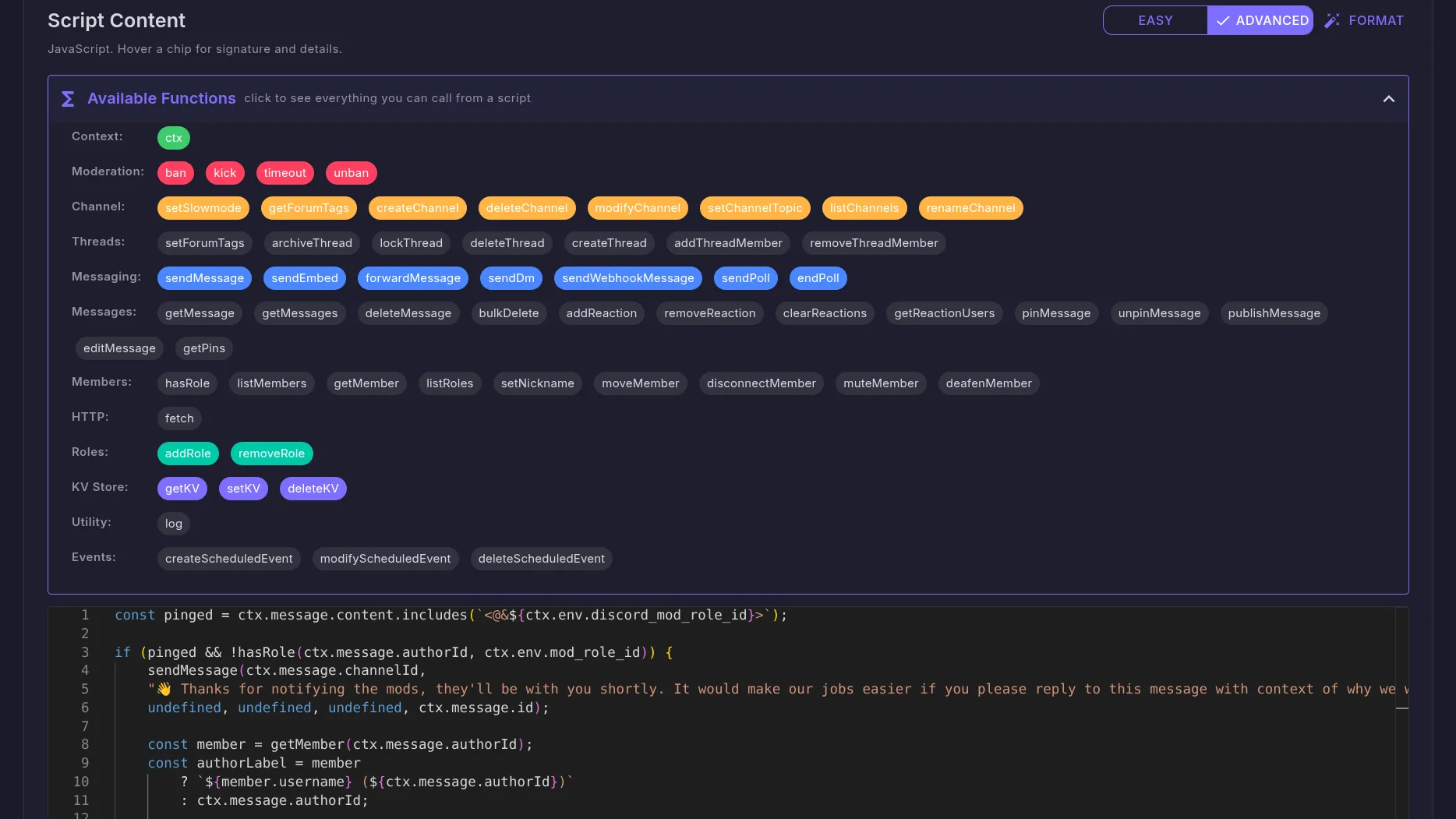
The Mallard script editor, with an Available Functions reference above a JavaScript script in a code editor.
dashboard / scripts / trigger

Configurable slash commands

Define typed options, required flags, and member permissions. Mallard registers them directly with Discord.
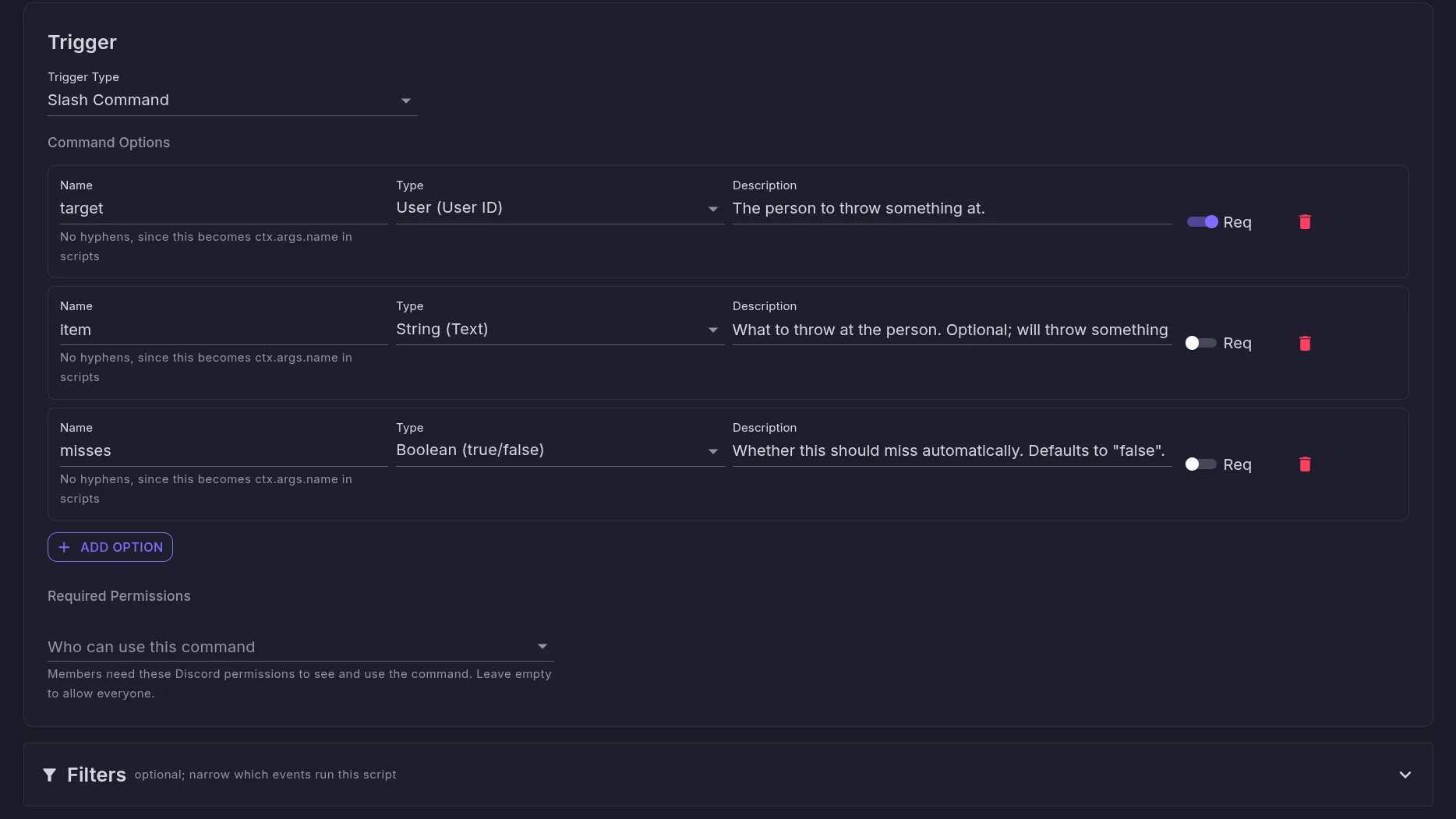
The trigger editor for a slash command, showing three typed command options with their required flags and a required-permissions selector.
dashboard / database

Shared guild key-value storage

Persistent key-value storage for scripts, alongside environment values and write-only secrets managed in the dashboard.
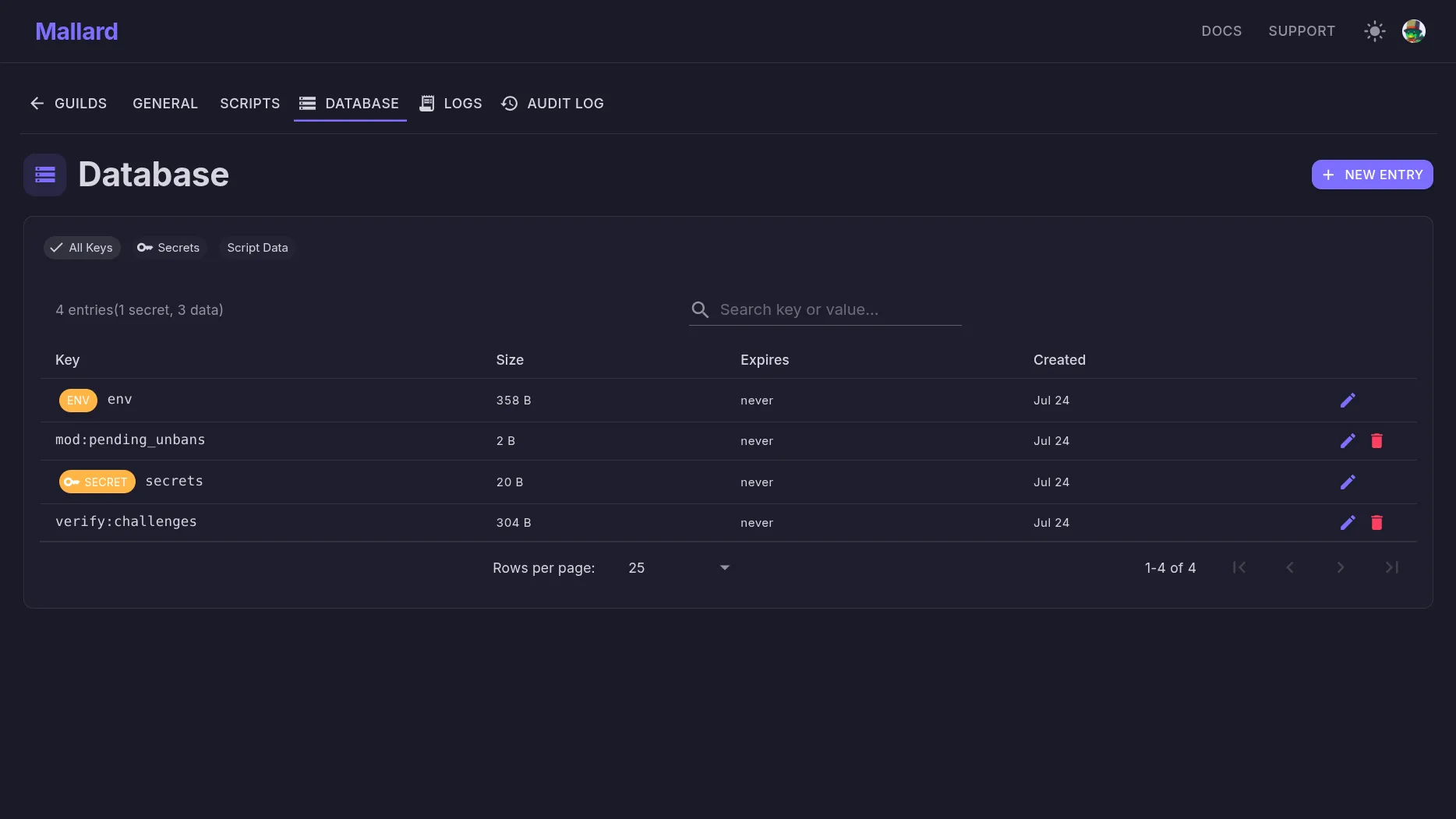
The dashboard database page listing key-value entries for a guild, including the env row and the write-only secrets row.
dashboard / logs

Live execution traces and activity logs

Debug script runs in real time with sub-millisecond execution breakdowns and full configuration audit history.
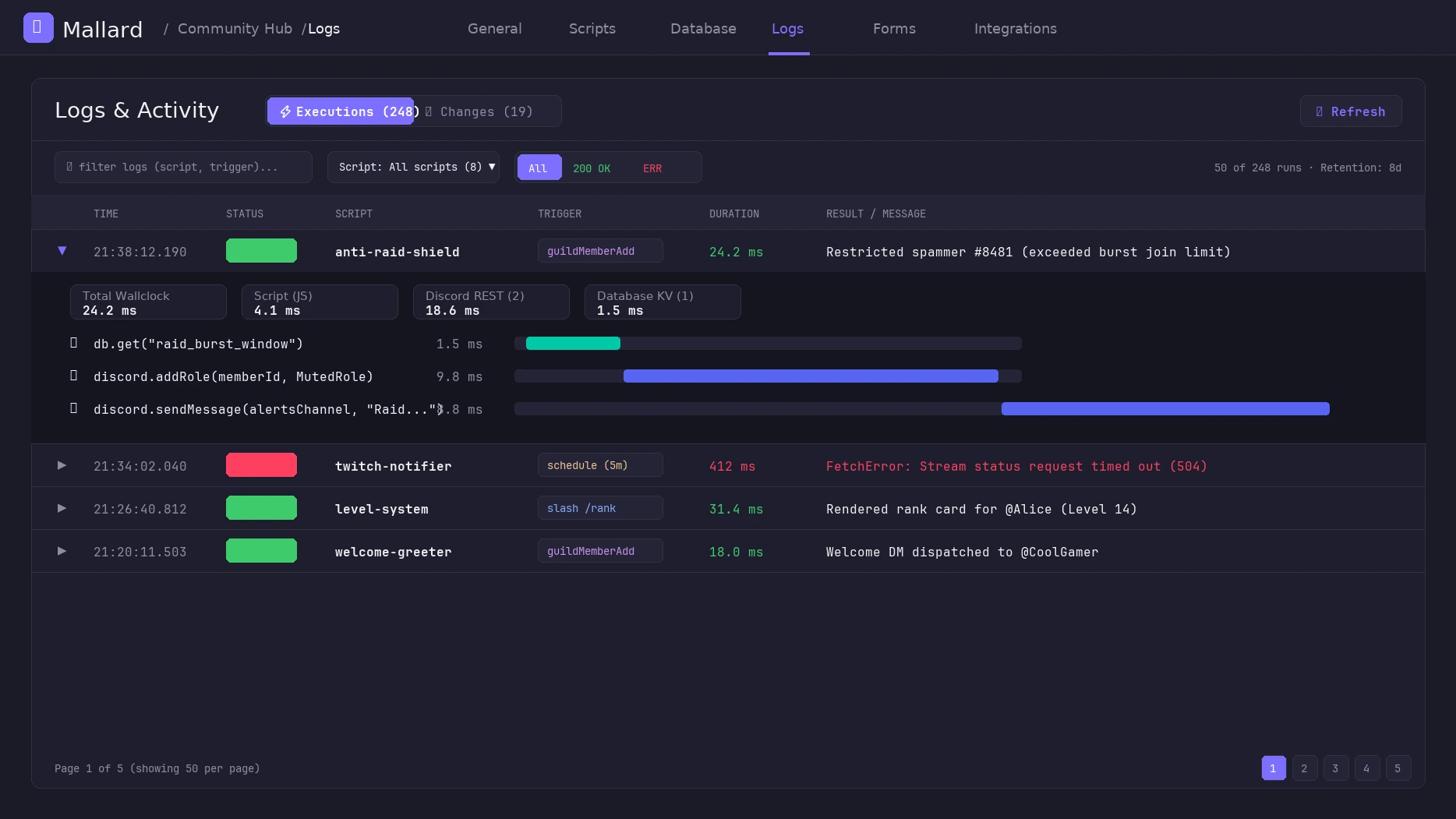
Execution traces and live activity logs, showing sub-millisecond waterfall latency breakdowns and audit history.
Available Now
Native Integrations: Twitch & YouTube

Connect channels directly in your dashboard. Run scripts immediately when creators publish videos or streamers go live — no RSS polling, no external webhooks, with full access to ctx.twitch and ctx.youtube.

Twitch
Available

Fires on stream online and offline. Delivers stream title, game category, viewer count, and live channel info.

TwitchStreamOnline TwitchStreamOffline
YouTube
Available

Real-time upload and stream notifications. Supports channel handles (e.g. @dougdoug) and Shorts filtering via ctx.youtube.isShort.

YouTubeVideoPublished YouTubeStreamOnline

beta: pricing and tier limits are subject to calibration

What a script looks like

Plain JavaScript against a small API. Discord actions, an HTTP client, per-guild storage, and secrets your moderators never see.

imgspam.js

Catch image-spam automatically

MessageCreate
// Times out repeat image-posters for mods to review, no command needed
const key = `imgspam.${ctx.message.authorId}`;
const recent = JSON.parse(getKV(key) || "[]")
    .filter(e => Date.now() - e.timestamp < 10000);
recent.push({ messageId: ctx.message.id, timestamp: Date.now() });
setKV(key, JSON.stringify(recent), 60);

if (recent.length >= 3 && ctx.message.attachments.length > 0) {
    timeout(ctx.message.authorId, "Image spam", 1440);
    sendMessage(ctx.env.mod_alert_channel_id, "🖼️ Timed out for image spam. Please review.");
}
Discord Outcome // what happens in your server
spammer
posting repeat image attachments...
MallardBOT
🖼️ Timed out for image spam. Please review.
ai-summary.js

Call an AI without leaking your key

SlashCommand
// ctx.secret.* are opaque {{secret:NAME}} tokens. The real key is
// injected only inside fetch(), never visible to the script (or your mods)
const chat = getMessages(ctx.channelId, 100).reverse()
    .map(function (m) { return m.authorDisplayName + ": " + m.content; })
    .join("\n");

const res = fetch("https://openrouter.ai/api/v1/chat/completions", {
    method: "POST",
    headers: {
        authorization: "Bearer " + ctx.secret.OpenrouterKey,
        "content-type": "application/json"
    },
    body: JSON.stringify({
        model: "google/gemini-3.1-flash-lite",
        messages: [{ role: "user", content: "Summarize this chat:\n" + chat }]
    })
});
editResponse(JSON.parse(res.body).choices[0].message.content);
Discord Outcome // what happens in your server
Moderator
/summarize
MallardBOT
Summary of last 100 messages: The server discussed moving from MEE6 to Mallard, tested reaction roles, and configured Twitch announcements.
golive.js

Announce when you go live

TwitchStreamOnline
// Twitch events arrive as triggers just like Discord ones
if (ctx.env.twitch_announce_channel_id) {
    sendMessage(ctx.env.twitch_announce_channel_id, "", [{
        title: "🔴 Live now: " + ctx.twitch.title,
        description: "Playing " + ctx.twitch.category
            + " at twitch.tv/" + ctx.twitch.broadcasterLogin
    }]);
}
Discord Outcome // what happens in your server
MallardBOT
🔴 Live now: Building custom Discord bots in JS! Playing Software and Game Development at twitch.tv/mallarddev
youtube-announcer.js

Post YouTube uploads automatically

YouTubeVideoPublished
// Fires on upload without RSS polling. ctx.youtube gives you title, url, etc.
if (ctx.youtube.isShort) return; // Skip YouTube Shorts if desired

sendMessage(ctx.env.yt_announce_channel_id || ctx.channelId,
    `📺 New video from **${ctx.youtube.channelTitle}**: **${ctx.youtube.title}**\n${ctx.youtube.url}`);
Discord Outcome // what happens in your server
MallardBOT
📺 New video from **DougDoug**: **We cloned our voices with AI and had them argue** https://www.youtube.com/watch?v=dQw4w9WgXcQ

Browse the full template library

Start with what you need

Install the bot, use the included moderation commands, and customize them as your server grows. Add new commands in JavaScript whenever you're ready. The docs cover every trigger and function.

Read the docs Go to dashboard →

Questions, or want to see what other servers are running? The support server has a scripts hub.

An unhandled error has occurred. Reload 🗙